Team HOAfy
Meet Your Dollar
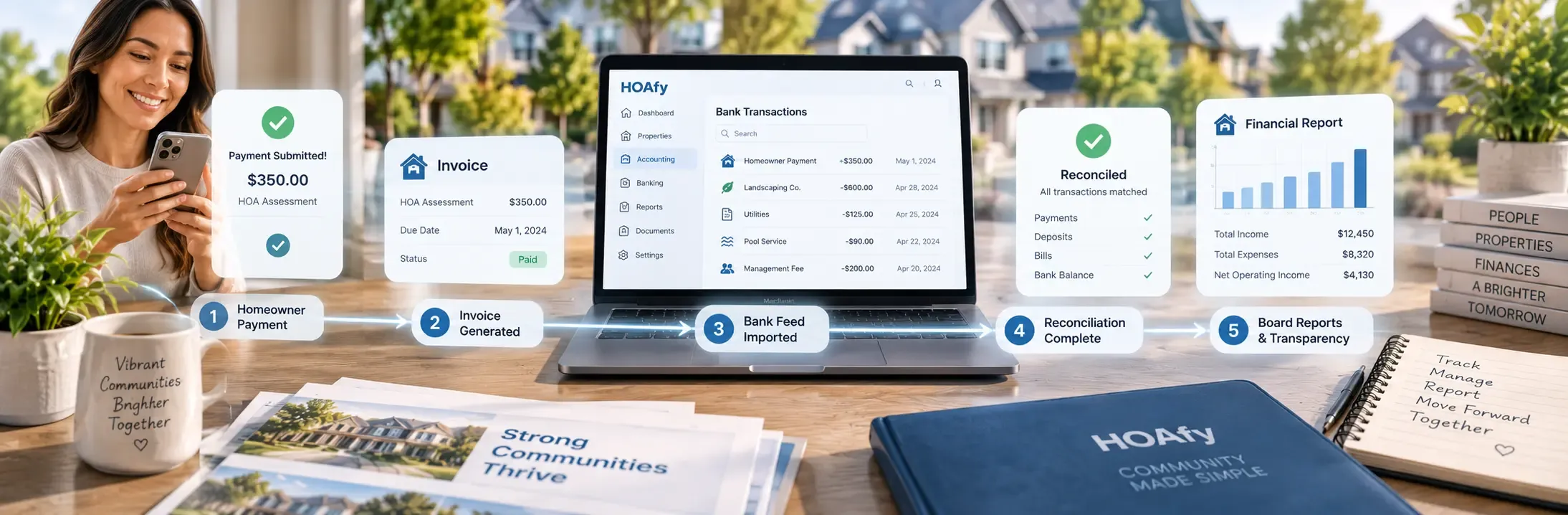
Somewhere in your community, a homeowner just paid their monthly assessment. Call it $250. That dollar bill (well, the ninety-nine other dollars riding along with it) is about to go on a trip — through invoicing, into the ledger, past a bank feed, through a reconciliation, and eventually into a board report that gets read out loud at a meeting nobody wanted to attend.
Most HOA software treats that journey as a black box: money goes in, a balance goes up, nobody asks questions. HOAfy treats it as a fully documented paper trail, at every stop. This article follows the dollar the whole way, and introduces every feature it meets along the road. Buckle up — accounting software has never been this much of a road trip.
Stop 1: The Invoice That Started It All
Before there's a payment, there's an invoice. HOAfy generates recurring dues for the entire community in a few clicks — monthly, quarterly, annually, whatever your governing docs say. Miss a due date and the system doesn't shrug; it applies automatic late fees (flat or percentage, with optional compounding) and sends past-due reminders without anyone lifting a finger.
Homeowners pay online by ACH or card, or enroll in autopay and never think about it again. Every payment is automatically matched back to the invoice it settles — no treasurer manually typing "received $250 from unit 4B" into a spreadsheet at 11pm.
The dollar has now officially entered the building.
Stop 2: Where Does the Money Actually Live?
Here's where a lot of "HOA software" quietly stops being accounting software and starts being a glorified spreadsheet. HOAfy doesn't. Every dollar lands in a real double-entry general ledger, supporting both cash and accrual basis, built on a proper chart of accounts.
And critically: it supports multi-fund accounting. Your operating fund and your reserve fund are not the same pile of money with a label on it — they're genuinely separate funds inside the same ledger, the way a reserve study (and a good auditor) expects. Need to move money between funds for a legitimate reason? Inter-fund transfers post as real, auditable journal entries — not a silent balance adjustment nobody can explain a year later.
Made a mistake on a journal entry? You don't get to just delete inconvenient history. Journal entries reverse with one click, posting a mirror-image entry that keeps the original visible forever. That's not bureaucracy for its own sake — it's the difference between books an auditor trusts and books an auditor has questions about.
Stop 3: The Bank Feed Interrogation Room
This is where most treasurers' Saturday afternoons used to go to die. HOAfy connects to your bank via Plaid and pulls transactions automatically — no CSV downloads, no printing statements, no highlighters.
But what if your bank isn't on Plaid, or your board just isn't ready to grant that kind of access yet? You're not stuck. HOAfy also supports manual bank connections, where you register the account's identity (nickname, institution, last four, routing number) without a live feed, and reconcile it by pasting in a CSV. Same ledger, same audit trail, same rigor — just a different on-ramp.
Once transactions arrive (by either road), they don't just dump into your books. Each one goes through a little interrogation:
- Auto-matched against a posted journal entry, when the system is confident (a Stripe payout, a check clearing by check number, a familiar recurring vendor draft).
- Flagged for review when it's not obvious, with actions to match / split it against one or more journal lines, categorize it against a GL account on the spot, or ignore it if it's genuinely not yours to book.
- Reconnected with one click if the bank link goes stale — no need to recreate the connection from scratch and lose history.
Nothing gets waved through unexamined. That's the point.
Stop 4: Reconciliation, Minus the Dread
Once the bank feed and the ledger agree on (almost) everything, it's time to reconcile. HOAfy auto-matches the obvious majority of transactions and leaves you a short, human-sized list of exceptions — instead of a three-hour highlighter session against a printed bank statement.
When everything ties out, the reconciliation locks, with a signed record of who did it and when. That locked reconciliation becomes the anchor for everything downstream: reports, audits, and the next period's opening balance.
Stop 5: Closing the Books (For Real This Time)
Here's a feature boards love and rarely knew to ask for: accounting period close. Close a month (or a year) and HOAfy locks it — no one can quietly backdate a journal entry into February after March's reports have already gone out.
Need to reopen a closed period because something genuinely needs fixing? You can — but it requires a documented reason, and the reopen (and the reason) live permanently in the audit trail. Not "no take-backs," just "no silent take-backs."
Stop 6: The Reports Everyone Actually Reads
All that rigor exists to produce numbers people can trust when the board finally looks at them. HOAfy generates the reports that matter:
| Report | The question it answers |
|---|---|
| Income statement (P&L) | Are we operating within our means this period? |
| Balance sheet | What do we own and owe, right now? |
| AR aging | Who owes assessments, and how overdue are they? |
| Delinquency report | Which balances need collections action? |
| Budget vs. actual | Are we tracking the plan the board approved? |
You can save custom report views, and — this is the part treasurers particularly enjoy — schedule board packets to generate and land automatically, instead of assembling them by hand the night before every meeting. Export anything to PDF or CSV when someone inevitably asks for "just the numbers."
Stop 7: When the Dollar Goes the Other Direction
Not every dollar comes in from a homeowner — plenty go out to vendors. HOAfy tracks that side of the trip too: a completed work order becomes a vendor bill without re-entering the job, posts the correct expense and Accounts Payable entries, and clears against cash when payment is recorded. The work order shows "Paid" the moment the ledger says so — one source of truth, not two systems quietly disagreeing.
The Dollar's Entire Trip, Summarized
- Invoiced, reminded, late-feed if needed, paid via ACH/card or autopay.
- Posted to the correct fund in a real double-entry ledger.
- Matched, categorized, or reviewed as it arrives from the bank (Plaid or manual).
- Reconciled and locked with a signed audit trail.
- Sealed inside a closed accounting period.
- Reported to the board — on a schedule, without anyone building a spreadsheet by hand.
Every stop leaves a record. Nothing here is a black box, and nothing here requires a treasurer with a CPA license — just a board that wants to trust its own numbers.
See the full HOA accounting feature set and give your dollar a much less stressful trip.