HOA accounting, HOA accounting software, HOA financial management, Self-managed HOA, HOA board, Financial, Board Tips
Team HOAfy
What Is the Best HOA Accounting Software?
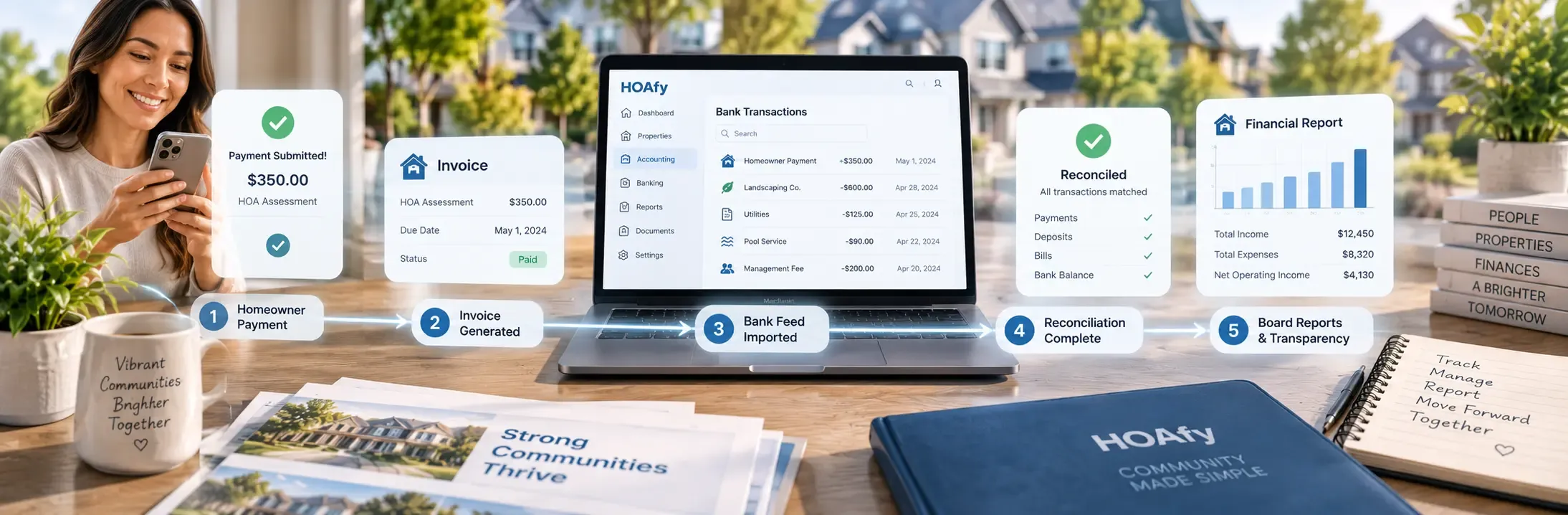
The best HOA accounting software is not simply a bookkeeping program with the words "community association" added to the website. It should connect assessments, owner payments, bank activity, funds, vendor expenses, budgets, financial statements, and board oversight in one reliable accounting trail.
For most self-managed associations and smaller HOA management companies, the strongest choice is purpose-built software with:
- A real double-entry general ledger
- A flexible chart of accounts
- Balanced journal entries and documented reversals
- Separate operating, reserve, and special-purpose funds
- Bank connections and monthly reconciliation
- Accounting periods with controlled closing and reopening
- HOA assessment billing, owner ledgers, and payment processing
- Annual budgets and budget-to-actual reporting
- Standard financial statements, custom reports, and recurring board packets
- Role-based permissions, audit history, and usable exports
- AI assistance that can explain the numbers and locate supporting records without replacing human approval
HOAfy brings these functions together with the rest of association management. Billing, accounting, bank activity, homeowner records, work orders, vendor bills, documents, communications, and reporting share the same association data. HOAfy Copilot gives authorized board members another way to ask financial questions, find reports, and receive suggestions while the board remains responsible for review and decisions.
Disclosure: HOAfy publishes this guide. We explain where HOAfy fits and identify current limitations so associations can evaluate it on real workflows rather than feature labels. This article was reviewed on October 7, 2026.
Watch HOAfy accounting in the demo
Why General Bookkeeping Software Is Often Not Enough
General accounting software can maintain a ledger, but an HOA has workflows that ordinary small businesses do not.
An association bills assessments to units, may have several owners attached to a unit, maintains operating and reserve funds, applies collection policies, tracks prepaid assessments, and reports to a volunteer board. It may accept online and offline payments, transfer money between funds, pay vendors for community work, and prepare a board packet every month.
When the accounting system does not understand those relationships, volunteers fill the gaps with spreadsheets. The invoice lives in one application, the owner list in another, the payment record in a third, and the board report on someone's laptop. Every duplicate entry creates another chance for dates, balances, names, or account classifications to disagree.
Purpose-built HOA accounting software reduces that fragmentation. The goal is not merely to store transactions. The goal is to preserve the path from the original association activity to the ledger and from the ledger to the board's report.
1. Double-Entry General Ledger and Chart of Accounts
A serious HOA accounting system should use double-entry accounting: every transaction has balanced debits and credits. This structure allows the balance sheet, income statement, cash flow statement, trial balance, and general ledger to agree with one another.
The chart of accounts should include assets, liabilities, equity or fund balance, income, and expenses. Associations should be able to add appropriate accounts, organize them clearly, and archive unused accounts without erasing history.
Ask a vendor to demonstrate these common events:
- An assessment is issued to an owner.
- The owner pays online.
- A processing fee is recorded.
- The payment is included in a bank deposit or processor payout.
- A landscaping bill is posted and later paid.
- Money is transferred between operating and reserve accounts.
Do not accept a dashboard total as proof of accounting. Ask to see the journal entries and the resulting reports.
How HOAfy Handles It
HOAfy provides a double-entry ledger with a configurable chart of accounts. System workflows create entries for supported invoices, payments, deposits, transfers, and vendor bills. Authorized users can also create manual journal entries when an adjustment is appropriate.
This is valuable because the accounting record is connected to the operational source. A board member can move from a financial total to the underlying invoice, payment, bill, or journal instead of trying to reconcile separate applications.
2. Journal Entries, Corrections, and Audit History
Manual journals are necessary for accruals, corrections, depreciation, year-end adjustments, and transactions that do not originate in another workflow. The software should require debits and credits to balance and should retain the date, description, accounts, amounts, source, and user who posted the entry.
Corrections are equally important. Good accounting software does not encourage users to rewrite posted history. It supports reversals, preserving the original entry and the correcting entry so an accountant or auditor can understand what happened.
HOAfy requires balanced journals and supports reversal history. The practical rule for associations is simple: reverse and explain; do not delete and conceal.
3. Fund Accounting
An HOA's operating cash and reserve cash may belong to the same legal entity, but they serve different purposes. The accounting system should let the association track activity by fund and produce reports that distinguish operating, reserve, and any other board-approved funds.
Look for:
- Operating and reserve funds as a practical starting structure
- Additional funds for special projects or designated purposes
- Account-to-fund mappings
- Fund-specific budgets and reports
- Balanced inter-fund transfers
- Clear fund balances on financial statements
Moving cash between bank accounts should not appear as new income or an ordinary expense. HOAfy treats supported inter-fund transfers as balanced journal activity and lets associations create additional funds beyond the standard operating and reserve structure.
4. Accounting Periods and Month-End Close
Without period controls, a user can accidentally backdate a transaction into a month the board has already reviewed. That changes prior reports and makes it difficult to explain why this month's opening numbers no longer match last month's closing numbers.
HOA accounting software should allow an authorized user to:
- Define accounting periods
- Review incomplete work before closing
- Close a month or fiscal year
- Prevent ordinary changes to closed periods
- Reopen only with appropriate permission and a documented reason
- Record the close and reopen events in the audit history
HOAfy supports accounting-period creation, closing, and controlled reopening. Associations should still adopt an internal policy that names who may close the books and who may approve a reopening. Software permissions support governance; they do not replace it.
5. Bank Connections and Transaction Feeds
Bank feeds reduce data entry, but they should not silently decide the accounting treatment of every transaction. A bank transaction proves that money moved. It does not always prove why it moved or which fund, vendor, owner, or expense account is correct.
Strong bank connectivity should include:
- Secure institution connection and consent
- Mapping of bank accounts to general-ledger cash accounts
- Automatic synchronization of available transactions
- Support for added, modified, and removed feed transactions
- Suggested matches to existing ledger activity
- Splitting and categorizing unmatched items
- Transfer identification
- A manual import path when a live connection is unavailable
- Clear connection status and reconnection workflow
HOAfy connects eligible association bank accounts through Plaid and synchronizes available transaction activity. Users can review, match, split, categorize, ignore, undo, and link transfers. Associations can also use CSV data for reconciliation when they do not use a live feed.
Plaid is for the association's bank activity. It is separate from Stripe, which handles homeowner card and ACH payments. Keeping those roles clear helps a treasurer diagnose a payment, payout, or bank-feed question correctly.
6. Bank Reconciliation
Reconciliation is the monthly proof that the ledger agrees with the bank. Software should compare a statement ending balance and transactions with posted accounting activity, identify unresolved differences, and permit completion only when the difference is zero.
Useful matching suggestions can save time, but they should remain suggestions. Two transactions can have the same amount and occur on nearby dates. The reviewer should confirm the payer or payee, description, deposit grouping, check number, and transfer direction.
HOAfy supports statement dates and balances, imported or feed transactions, suggested matching, exception resolution, and zero-difference locking. Its automatic match logic helps narrow the review; the treasurer or accountant confirms the evidence.
Reconciliation Tip
Reconcile every bank account every month. Do not wait for year-end. A missing deposit, duplicated expense, bank fee, returned payment, or uncleared check is easier to investigate while the records are fresh.
7. Assessments, Owner Ledgers, and Payments
Accounting does not begin at the bank statement. For an HOA, it begins with what each unit owes and why.
The software should connect:
- Regular and special assessments
- Recurring billing schedules
- Invoice line items and GL mappings
- Late fees and documented waivers
- Online card and ACH payments
- Autopay
- Check, cash, money order, and other offline payments
- Partial allocations where supported
- Credits and prepaid assessments
- Refunds, reversals, failures, and disputes
- Owner statements and payment history
HOAfy connects assessment billing to the general ledger and owner records. Online payments use the association's own Stripe Connect account, so HOAfy does not hold association funds. Signed Stripe webhooks confirm the accounting event rather than relying on a browser success screen. Manual payments, allocations, reversals, deposit batches, and prepaid credit also retain their accounting trail.
That connection matters during reconciliation. The reviewer can trace a bank deposit or Stripe payout back to the payments and invoices that produced it.
8. Budgets and Budget-to-Actual Review
A budget is more than a file approved at the annual meeting. It should become a working benchmark throughout the year.
HOA accounting software should support:
- Fiscal-year budgets
- Fund and account structure
- Monthly or annual planned amounts
- Draft, review, approval, and amendment history
- Notes and assumptions
- Budget-to-actual reporting
- Material-variance thresholds and drill-down
- Preservation of the board's adoption evidence
HOAfy supports budget records, fiscal years, funds, account/month values in its data model, notes, workflow state, versioned amendments, and budget-variance reporting with ledger drill-down. Its current web budget editor is strongest for budget metadata and variance review; associations that require spreadsheet-style monthly allocation authoring should test that exact workflow during the evaluation.
Keep the approved budget, minutes, and any signed resolution in the association's document records. The accounting system should show the working numbers, while the documents preserve evidence of adoption.
9. Standard Financial Reports
At minimum, HOA accounting software should produce:
| Report | What it helps the board understand |
|---|---|
| Income statement | Revenue, expenses, and operating results for a period |
| Balance sheet | Cash, receivables, liabilities, and fund balances at a point in time |
| Cash flow statement | Why cash increased or decreased |
| Trial balance | Whether account balances and debits and credits are internally consistent |
| General-ledger detail | Which transactions make up an account balance |
| AR aging | How long owner balances have remained unpaid |
| Delinquency report | Which owner accounts require policy-based review |
| Payment register | Which payments were made or received during a period |
| Budget variance | Where actual activity differs from the approved plan |
Reports should offer relevant date, fund, basis, account, and status filters. Where both cash and accrual views are available, the report should clearly identify the basis. The association should adopt one primary reporting policy and avoid switching bases merely to improve the appearance of results.
HOAfy includes these core reports and treasurer dashboard metrics. Several reports support CSV export. Associations should confirm the required output format for each report rather than assuming every screen exports to a polished PDF.
10. Custom Reports and Board Report Packets
Standard reports answer recurring accounting questions. Custom reports help a board investigate questions specific to its property, funds, or account structure.
Look for saved filters, grouping, supported dimensions, reusable report definitions, drill-down, and common calculations such as sum, count, and average. A custom report should remain tied to source data, not become an unexplained spreadsheet that only one volunteer understands.
Board report packets should let the association select reports, define an order, set a schedule, choose recipients, and review a sample before recurring distribution. The packet process should also record whether generation and delivery succeeded.
HOAfy supports saved, pivot-style reports and scheduled report packets. Income statements, balance sheets, and trial balances are assembled by the packet workflow. Some other accepted packet types can currently direct the recipient back to the web application rather than produce a fully assembled report, so preview the exact packet before relying on unattended delivery.
11. Permissions, Auditability, and Data Portability
Financial software contains sensitive owner and association information. Every user should have an individual account, permissions should follow job responsibility, and access should be removed promptly when a board or management role ends.
Evaluate:
- Role-based access to billing, journals, bank feeds, periods, and reports
- Audit history for sensitive changes
- Documented correction and reopening reasons
- Multifactor authentication and secure provider connections
- Backups and retention
- CSV or other usable exports
- A practical handover process when officers change
Avoid a shared treasurer password. It weakens security and makes the audit history much less useful.
How HOAfy Copilot Helps With HOA Accounting
HOAfy Copilot is an association-scoped assistant for authorized account owners and board users with the appropriate permission. It uses the signed-in user's normal product access, so it does not bypass role controls or search across unrelated associations.
Copilot can make accounting work faster in three useful ways.
1. Find Answers and Supporting Records
An authorized user can ask:
- "What were our total expenses year to date?"
- "Which units have outstanding balances?"
- "Show me the income statement for the current period."
- "Which bank transactions still need review?"
- "Where is our budget variance report?"
Copilot can summarize current association information and provide a path to the relevant report or record. The user can then inspect the source rather than treating the chat response as the accounting record.
2. Explain Workflows and Recommend Next Steps
Copilot can explain how to record a manual payment, distinguish a Plaid bank feed from Stripe ACH, describe a reconciliation workflow, or suggest the reports to review before a board meeting.
It can also help turn a broad question into a useful review sequence. For example, if expenses are over budget, Copilot may suggest opening the budget variance report, identifying the affected accounts, drilling into general-ledger detail, checking whether the variance is timing-related, and documenting the board's conclusion.
These suggestions are decision support, not accounting, legal, or tax advice.
3. Reduce Navigation and Repetitive Setup
Copilot's shared tool catalog covers accounting, billing, budgets, payments, reports, and other association workflows. It can help an authorized user locate records and complete supported tasks without remembering every menu path.
Consequential work still needs human control. Copilot cannot close an accounting period through its current tool surface, and associations should review any proposed financial change before it is posted. It does not replace the treasurer, accountant, board approval, signatures, or votes required by policy or law.
Why HOAfy Is a Strong Choice
HOAfy covers the accounting functions an association needs while keeping them connected to the community activity that creates the numbers.
- Connected HOA billing: Assessments, invoices, owner balances, online payments, manual payments, and the ledger share one workflow.
- Real accounting controls: The chart of accounts, double-entry journals, reversals, funds, transfers, periods, and audit history provide structure beyond a simple cash tracker.
- Flexible banking: Plaid feeds, transaction review, and CSV reconciliation support different bank and board preferences.
- Board-ready reporting: Standard reports, saved reports, budget variance, treasurer metrics, and scheduled packets support recurring oversight.
- Operational traceability: Supported work orders and vendor bills connect community work to expenses and Accounts Payable.
- Association-specific AI: HOAfy Copilot can answer permission-scoped questions, explain workflows, suggest review steps, and link users to supporting records.
- One association system: Financial information remains alongside owners, units, documents, requests, violations, communications, and governance history, improving continuity when volunteers change.
The result is less duplicate entry and a clearer chain from "What happened in the community?" to "How was it recorded?" to "What should the board review?"
Tips and Tricks for Associations
Establish a Monthly Close Checklist
Use the same sequence every month:
- Confirm owner payments, processor payouts, and manual deposits.
- Review failed, refunded, reversed, and disputed payments.
- Post outstanding vendor bills and approved adjustments.
- Synchronize bank feeds and classify unresolved transactions.
- Reconcile every bank account to a zero difference.
- Review the trial balance and unusual account balances.
- Run the income statement, balance sheet, cash flow, aging, delinquency, payment register, and budget variance.
- Record review questions and resolutions.
- Close the period with an explanatory note.
Separate Preparation From Review
When practical, have one person prepare the reconciliation and another review bank statements, unusual transactions, and financial reports. Small associations may have limited volunteers, but even a quarterly second review improves oversight.
Keep Operating and Reserve Activity Distinct
Use funds and dedicated bank or investment accounts consistently. Record inter-fund transfers explicitly. Do not classify a transfer as income merely because cash entered an account.
Prefer Reversals Over Deletions
Mistakes happen. Preserve the original record, post the correcting transaction, and explain the reason. This saves time during audits and board transitions.
Review Exceptions, Not Just Totals
Focus on unreconciled bank items, old receivables, unapplied credits, negative balances, unexpected account activity, large budget variances, duplicate amounts, and transactions posted near a period boundary.
Preview Every Recurring Board Packet
After changing packet contents, recipients, filters, or schedules, generate a sample. Confirm that dates, funds, accounting basis, and supporting detail are correct before the next meeting.
Use Copilot to Start an Investigation, Not End It
Ask Copilot for the relevant total, trend, or report. Then open the linked source, verify the period and basis, inspect material transactions, and document the board's conclusion.
Involve the Association's Accountant Early
Have a qualified accountant approve the chart of accounts, fund structure, opening balances, migration plan, and year-end procedures. Good software makes those decisions easier to implement; it does not make professional judgment unnecessary.
A Practical Demo Checklist
Ask every shortlisted vendor to complete the same scenario with sample data:
- Create a recurring assessment for several units.
- Record one online payment and one check payment.
- Trace both payments to the owner ledger and general ledger.
- Post a vendor bill to an expense account and reserve fund.
- Import or synchronize bank activity and match the transactions.
- Complete a reconciliation to zero difference.
- Post and reverse a manual journal entry.
- Close a period, attempt a backdated change, and demonstrate controlled reopening.
- Enter or import a budget and show budget-to-actual drill-down.
- Produce standard reports, a custom report, and a scheduled board packet.
- Show what a treasurer, director, homeowner, manager, and accountant can each access.
- Export the association's financial data in usable form.
For HOAfy, add three Copilot questions to the demonstration: "Which units are delinquent?", "What were total expenses this year?", and "Which reports should we review before closing this month?" Open the supporting records after every answer.
Frequently Asked Questions
Can HOA accounting software replace QuickBooks?
Yes, if it has a true general ledger, chart of accounts, balanced journals, funds, reconciliation, period controls, budgets, audit history, and the financial statements the association and its accountant require. HOAfy includes native HOA accounting. The association should still plan data migration and have its accountant validate opening balances and reports.
Should a small HOA use spreadsheets?
Spreadsheets can help with analysis, but they are a fragile primary accounting system. Formula errors, duplicate files, weak permissions, missing audit history, and volunteer turnover become more serious as transactions and owners increase.
Does an HOA need fund accounting?
Most associations need at least a clear distinction between operating and reserve activity. Governing documents, state law, lender requirements, and the association's accountant may impose additional rules. The software should support the required structure without treating transfers as revenue or expense.
How often should an HOA reconcile bank accounts?
Monthly is a strong default, and reconciliation should occur before the corresponding period is closed. High-volume associations may also monitor feeds and exceptions during the month.
Can AI do HOA accounting automatically?
AI can locate records, summarize data, explain workflows, and suggest next steps. It should not independently establish accounting policy, approve a budget, close the books, make collection decisions, or replace review by the board and accountant. In HOAfy, Copilot operates within the signed-in user's association and permissions.
Final Recommendation
Choose HOA accounting software by testing a complete monthly cycle, not by counting features on a pricing page. The system should connect assessments to payments, payments to bank activity, bank activity to reconciliation, reconciliation to period close, and the ledger to board-ready reports.
HOAfy is a strong choice for self-managed associations and smaller HOA management companies that want purpose-built billing, double-entry accounting, funds, journals, bank feeds, reconciliation, periods, budgets, reports, packets, and association-aware Copilot assistance in one platform. Its greatest advantage is connection: financial records do not sit apart from the owners, units, vendors, work, documents, and decisions that produced them.
Explore HOAfy financial management, learn how to review HOA financial reports, or see HOAfy Copilot in action.